Video
How to Cut Yourself Out of Video for Free, With Clean Hair
Every free background remover I tried made my hair look painted on. So I worked out why, and rebuilt the cutout with free, open-source tools. Here's what changed, and the exact setup.

Contents
The short answer
To cut yourself out of a video for free with clean hair, fix the filming first: a plain darker wall, light in front of you, exposure locked. Then run a high-resolution open-source matting model (we use BiRefNet_HR-matting, MIT licence), steady the edges over time, re-solve the hair colour and fill the solid middle.
I film my Shorts on a phone, in a normal room.
Then I put myself on a studio set.
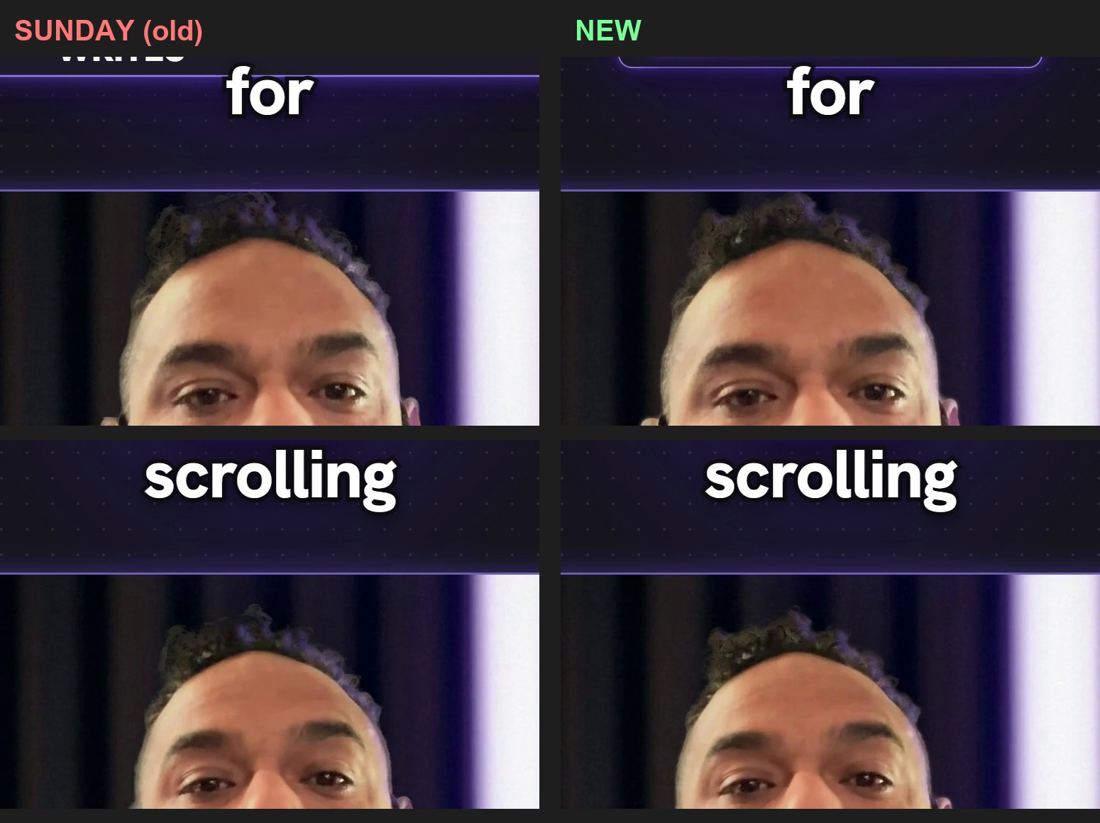
For weeks, it looked fine on the edit screen. And then I'd watch it on my phone and see it. My hair looked painted on. Bits of the set showed through my head. There was a faint light outline around me.
Nobody says "your cutout is bad". They just scroll past, because something feels off.
I'm Thomas. I run my businesses with an AI operator called Harris, which is Claude Code plus a folder of notes and a set of rules. If you want the whole picture, start with Claude Code for business owners. This post is about one job I gave it: make the cutout look real, using only free tools. Here's what we found, and the exact setup.
Why do phone cutouts look fake?
Three things give it away. Once you've seen them, you can't stop seeing them.
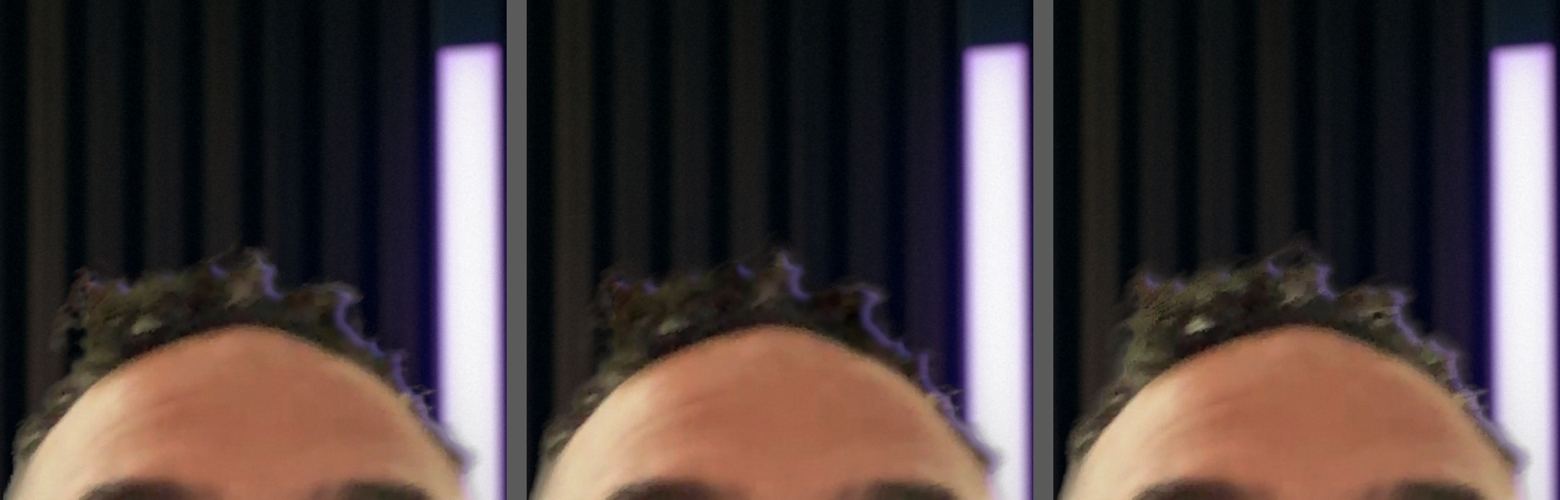
1. Smeared hair. Curly or fine hair turns into a soft blur. It looks painted, not grown.
2. See-through. The new background shows through your hair, and sometimes through your head. The cutout isn't fully solid.
3. A halo. A pale fringe of the old wall stays stuck to your outline. On a dark set, it glows.
Here's the same frame of my hair, three ways:
Why does it happen?
Our old engine was RobustVideoMatting, a popular free model. It's fast. To be fast, it works on a shrunk copy of each frame. We ran it at a quarter size.
At a quarter size, a curl is a couple of pixels. The model can't trace it, so it guesses. That's the smear.
Then we saved the cutouts with heavy compression, to keep the files small. That softened the edges again.
And no step fixed the colour of the edge pixels. A hair at the edge is part hair, part wall. Leave the wall part in, and you get the halo.
The see-through comes from the middle of the cutout being "mostly" solid instead of fully solid. Mostly solid is fine on a white page. On a busy studio set, you see the set through you.
What do pros do?
This surprised me. The pros don't win in the edit. They win when they film.
- A plain, darker, matte backdrop behind the person.
- Light in front, and often a light from behind on the hair.
- Exposure locked, so the wall never blows out to white.
- Or they film on a real set, and skip the cutout altogether.
The edit tools they use, like DaVinci Resolve's Magic Mask or After Effects' Roto Brush, are good. But they're built for an editor sitting with each shot, fixing the mask by hand where it slips. That's not what I wanted. I wanted to press a button and walk away.
The free fix: what we use now
Four free, open-source pieces. Each one fixes one of the problems above.
- Find you at full detail. BiRefNet_HR-matting runs at 2048 x 2048, so the curls are big enough to trace. MIT licence.
- Steady the edges. A motion-aware blend smooths the edges between frames where you're still, and leaves them sharp where you move, so hands don't ghost.
- Fix the hair colour. pymatting re-solves the colour of each edge pixel, so the old wall colour leaves your hair. MIT licence.
- Fill the middle. A solid-core fill makes the inside of you fully solid, so the set never shows through your head.
Then the cutout is saved near-lossless (ProRes 4444), so nothing softens the edge again.
We checked the flicker, too, because a sharper model can be jumpier. Measured over 60 frames, in the soft band around the edge: the old engine scored 37.4, the new model on its own 50.0, and the new model with the smoothing 38.7. Lower is steadier. So the smoothing brings it back to the old engine's steadiness, with much better hair.
NoteWe looked hard at MatAnyone, the best open model we found for this. Its licence is non-commercial: commercial use needs the authors' permission. So we don't use it. Everything in our setup is fine for commercial use.
How to film so the cutout comes out clean
This is the biggest win, and it costs nothing. Good footage in, clean cutout out.
- A plain, darker, matte wall behind you. Not a white wall.
- Light in front of you. Face the window. Never a window behind you.
- Lock your exposure so the wall never blows out to white. On most phones, tap and hold on your face.
- Leave a hand's width of space above your head.
- Film in 4K if your phone can, at the highest quality setting.
One more from my own mistakes. Our teleprompter app was recording at 1080p and about 8 Mbps. It looked fine on the phone, but it was too soft for a clean edge. The normal camera app records 4K at around 25 Mbps. We now record at 20 Mbps. Check your app's settings before you blame the cutout.
What do you need to run it?
- A Windows PC with an NVIDIA graphics card. We run it on an RTX 3060 12 GB.
- It uses about 5.4 GB of graphics memory.
- About 3 GB of free disk space.
- Linux works with the same steps. A Mac runs it with
--cpu, but very slowly.
The setup is Python 3.12, ffmpeg, PyTorch, then one command:
python cutout_pro.py my_video.mp4 --bg studio.jpg
You get two files: my_video_cutout.mov (you, with a transparent background, for Premiere, Resolve, Final Cut, After Effects or CapCut desktop) and my_video_on_bg.mp4 (you on the new background, ready to post). Both keep your sound.
The full install, with every line to copy, is on the free cutout guide.
What are the honest limits?
I'd rather you knew these before you start.
It's slow. About 1.5 to 3 seconds per frame on an RTX 3060. A 45 second Short takes around 35 to 70 minutes. You start it and go and do something else.
It needs an NVIDIA card. Without one, it runs, but very slowly.
The files are big. The transparent .mov is about 1 GB a minute. That's the price of perfect edges.
It can't rescue bad footage. A blown-out white wall behind you, or a window behind your head, will still show. Filming right matters more than any model.
It's not magic on every frame. Fast hand movements and very fine flyaway hairs are the hardest parts for any cutout. The smoothing helps; it doesn't make them perfect.
If you'd rather someone set this up for you, that's the kind of job Harris does. And if you're curious what an AI operator actually is, start with what an AI agent is, or see the automations I run every week.
Get the free setup
Phone video in. You on a studio set out. Clean hair, nothing showing through, and every tool free.
Questions people ask
Can I remove the background from a video for free?
Yes. BiRefNet_HR-matting and pymatting are both MIT licensed, so they are free, including for commercial use. You need a Windows or Linux PC with an NVIDIA graphics card to run them at a sensible speed.
Why does my hair look blurry or see-through when I remove the background?
Most quick cutout tools work on a shrunk copy of your frame, so fine hair is guessed rather than traced. They also leave part of the old wall colour in the edge, and leave the middle of you partly transparent.
Do I need a green screen?
No. A plain, darker, matte wall with the light in front of you gets you most of the way. A green screen still helps, but it is not needed for this setup.
How long does it take?
About 1.5 to 3 seconds per frame on an RTX 3060 12 GB, so a 45 second Short takes around 35 to 70 minutes. You start it and leave it.
Does it work on a Mac?
It runs with the --cpu option, but it is very slow, because there is no NVIDIA card on a Mac.