Comments to enquiries
Instagram Comment to DM Automation: Turn Comments Into Enquiries While You Work
The comment comes in while you're with a client. By the time you reply, they've gone cold. Here's how to send the link the second they ask, and stay inside Meta's rules.

Contents
The short answer
Comment-to-DM automation sends a private message to anyone who comments a chosen word on your post. You pick the word, say PRICES, and the link you want sent. It works on Instagram professional accounts and Facebook pages through Meta's official messaging tools, and the reply lands in seconds.
You post your new price list. It's a good post.
Someone comments "price?" at ten in the morning. You're with a client. You see it at seven that night.
You reply. They've already booked somewhere else, or they've forgotten why they asked.
The comment was a hand up. A real person saying "I'm interested". And it went cold while you were working.
I'm Thomas. I run my own businesses with Harris, an AI operator built on Claude Code (the plain guide is Claude Code for business owners). We've run comment-to-DM on our own Instagram and Facebook since October. Here's how it works, the rules, and how to set it up.
What is comment-to-DM automation?
It's one simple rule. Someone comments a word, and they get your link in their messages straight away.
You pick the word. Say, PRICES. Your post says: "Comment PRICES and I'll send you the list."
Anyone who comments PRICES gets a private message with your link. In seconds. While you're busy.
It works because people ask for it. You're not messaging strangers. You're answering someone who put their hand up.
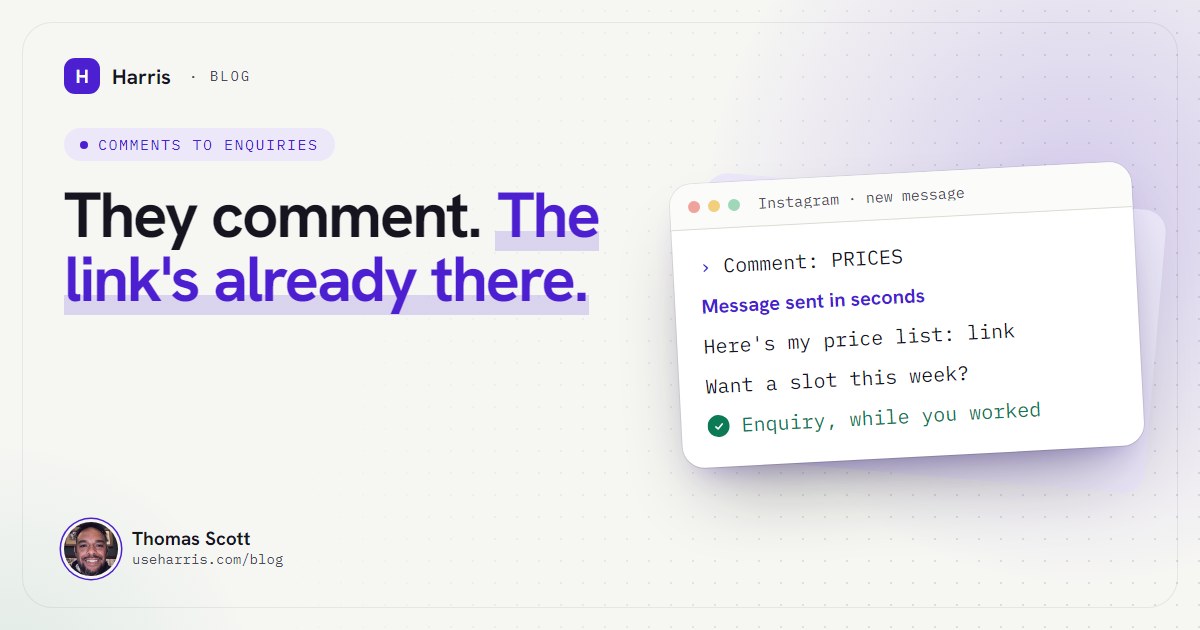
Comment on your post:
PRICES
Seconds later, in their messages:
Hi, here's my price list: yourlink
Want me to check a slot for you this week?
What are Meta's rules for automatic DMs?
This is the part most guides skip. Get it right and nothing gets blocked.
- It has to use Meta's official tools. Meta lets a business send a "private reply" to someone who commented on its post. Meta's developer page sets out the rules.
- One message per comment. Meta allows one private reply to the person who commented.
- Within 7 days. The reply has to go within 7 days of the comment.
- Professional accounts only. It works on an Instagram business or creator account, not a personal one.
- New accounts need time. A brand-new account needs a few weeks of normal use before you lean on automation.
Stay away from any tool that asks for your Instagram password and "logs in as you". That's not the official route.
How do I set it up myself?
You can do this yourself with a third-party tool that connects through Meta's official route. Here's the order I'd do it in.
- Switch to a professional account if you haven't. In Instagram settings, choose business or creator.
- Pick one word per offer. PRICES for your price list. BOOK for your booking link. One word, one link, so you can tell which post worked.
- Write the message. Short. Say hello, give the link, ask one easy question. "Want me to check a slot this week?" keeps the chat going.
- Connect a tool that uses Meta's official route. Set the trigger: comment contains PRICES, send this message.
- Test it with a second account. Comment the word. Then comment something else, and check nothing fires. Then try a capital letter or a typo.
- Say the word in the post. On the image, in the caption, out loud in the video. People can't comment a word they don't know.
TipDon't run it on posts about bad news, a complaint or a sensitive topic. An automatic cheerful link under the wrong post looks careless.
The awkward part is often the replies after the link: "can you do it cheaper?", "are you free Saturday?". The £9 Reply Pack writes those in your own words, in free ChatGPT, Claude or Gemini.
Who is comment-to-DM for?
It fits anyone whose customers ask questions in the comments:
- Personal trainers ("how much is a block of sessions?")
- Hairdressers and nail techs ("any space Friday?")
- Coaches ("where do I sign up?")
If nobody comments on your posts yet, fix that first. Automation can't answer a question nobody asks. Short videos that show your work help here. I wrote about that in short-form video for small business.
And once people are in your messages, get them onto your email list too. Social accounts come and go. A list is yours. More in the email newsletter guide.
What does Harris charge for comment-to-DM?
The job is from £595 to set up, then from £49 a month. Any monthly fee only starts once it's live and you've said yes.
What you get:
- Comment one word, get your link by message.
- Set up on Instagram and Facebook, and tested with a real comment.
- A one-page note of the word and the message, so you know what's running.
What I need from you: access to your Instagram business account and Facebook page, plus the word and the link you want sent.
What happens next:
- You press Buy now on the listing and pay securely with Stripe.
- You get an email asking for the few things I need.
- I set it up, usually within 72 hours of getting them.
- You can book a free set-up call with me if you want one.
The proof: it runs on our own Instagram and Facebook now. Comment the keyword on one of our posts on Instagram and the reply lands in your messages within seconds. Try it before you buy.
The honest bit: Instagram allows one private reply per comment. And a brand-new account needs a few weeks of normal use first.
If your enquiries come by phone more than comments, look at an AI receptionist for missed calls instead.
Questions people ask
Is auto DM allowed on Instagram?
Yes, when it runs through Meta's official messaging tools. Meta lets a professional account send a private reply to someone who commented on its post. Avoid tools that log in as you or scrape your account.
Do I need a business account?
You need an Instagram professional account, which means a business or creator account. A brand-new account needs a few weeks of normal use first.
How many messages can it send to one person?
Meta allows one private reply to the person who commented, and it has to go within 7 days of the comment. After that, the conversation is yours to carry on.
Does it work on Facebook too?
Yes. The same idea works on a Facebook page. We run it on both our Instagram and our Facebook page.